I am running for attorney general, and the thing I keep coming back to — in living rooms, in union halls, in every forum where somebody asks what I actually care about — is access to justice. Not as a slogan. As arithmetic.
Most people with a real legal problem never see a lawyer. Not because they don’t have a claim, and not because no lawyer would take it. They never see one because an hour of legal help costs more than the problem is worth to them, or more than they’ve got. That’s the whole of it. Legal aid is chronically underfunded and always will be. Pro bono is essential and will never scale to the size of the gap. If we’re serious about opening the courthouse door to the people standing outside it, there’s exactly one lever big enough to matter: the cost of producing legal work has to come down.
That’s what this section of the site is for.
The Practice Lab isn’t written for clients. It’s for other lawyers — solos, small firms, anybody whose practice runs out of hours long before it runs out of talent. I’m going to publish, in as much detail as I can manage, how this firm actually runs: the systems, the workflows, the tools I’ve built, the ones I’ve thrown away, and the mistakes that cost me real money before I understood them. Some of it will be about artificial intelligence. A lot of it will be about the far less glamorous business of managing your own attention.
There’s no signup, no course, no newsletter, and nothing for sale. I’m not asking for donations and there’s no subscription. The only thing I ask: if something here saves you time, spend some of it on people who couldn’t otherwise afford you. Take the case at a rate that works for somebody on a fixed income. Keep a sliding scale. Say yes to the file you’d otherwise turn down on economics. That’s the whole price.
The part of the AI conversation nobody’s having
The legal profession has spent three years arguing about whether AI can draft a brief.
Wrong argument. It’s been the wrong argument for a while. In my practice, daily use settled it: it drafts, it researches, it reads a four-hundred-page production overnight, it checks a citation against the actual reporter instead of against a memory, and it does all of it under supervision, with a lawyer signing the work. Whether it can produce work isn’t the interesting question anymore. The interesting one shows up around day thirty:
What happens to you when six of them are running at once?
Because that’s what this really looks like. You don’t use AI like a photocopier — one job, start to finish, then the next. You use it the way a partner uses associates. You hand off a discovery summary. While that’s running, you start a motion. While that’s running, a client calls and you open something for that. By eleven in the morning you’ve got six conversations going, each with its own history, each in a different matter, each waiting on something different from you.
And that’s where the promised efficiency quietly starts leaking out.
The load nobody warned you about
Six terminal windows on a screen aren’t six times the output. They’re six times the bookkeeping, and you’re the one keeping the books.
Here’s what actually happens when you come back to a window you left forty minutes ago. Before you can do one useful thing, you have to answer a handful of questions, and the only way to answer them is to read:
Which matter is this? The window doesn’t say. It says something like ~/Downloads or a folder name you picked at 8:40 that morning. So you scroll up. You find a filename. You recognize the client from the filename. That’s four or five seconds and a small, real mental effort — and it isn’t the work.
What did I ask it to do? Can’t see that either. Scroll further. Read your own prompt back to yourself. Rebuild what you meant forty minutes ago, which was obvious then and isn’t now.
Is it done, or is it waiting on me? This is the worst one, because nothing anywhere tells you. A finished session and an abandoned one look exactly alike. So you read the last few hundred lines to figure out whether the thing’s done, mid-thought, or stopped cold on a question it asked you thirty-five minutes ago that you never saw. That last one is pure waste: thirty-five minutes of nothing, sitting there looking exactly like progress.
Did anything come out of it? It wrote files somewhere. Which ones? Under what names? In which folder? You go look.
And what was I about to do next? You had a plan. The plan lived in your head, and your head’s been in three other matters since.
Call it fifteen to sixty seconds of pure reconstruction every time you change windows. Do that thirty times a day and you’ve burned real time. But the clock isn’t the expensive part. The expensive part is that every switch costs you the thing you were holding. Anybody who’s litigated knows the feeling. You’re thirty minutes into a summary judgment brief, you’ve got the argument built in your head, all the pieces are in the air — and the phone rings. The call takes four minutes. Getting back to where you were takes twenty, and some of what you had is just gone.
Parallel AI sessions manufacture that interruption on demand. They’re an interruption machine. Every window you check is a context switch you chose to inflict on yourself, and you check them constantly, because the alternative is not knowing.
Then there’s the second layer, which is worse because you can’t see it either:
- The fear of the buried window. Terminal windows stack. One slides behind another and stops existing. Somewhere back there is a session that finished two hours ago and has been sitting on a completed draft ever since. You don’t know it’s there. You’ll find it tomorrow.
- Closing the wrong one. Every window looks like every other window. Close the one you meant to keep and the conversation’s gone.
- The running tally. You’re carrying, with no help, a list of what’s in flight, in which matter, at which stage, waiting on what. That list lives nowhere but your head, and it’s the first thing to go on a bad day — the day with a hearing in the morning and a client crisis after lunch. Exactly the day you needed it.
- Work nothing else can see. None of this touches Clio. None of it touches the calendar. None of it touches the billing record. You did three hours of real work in six windows and there’s no trace of it anywhere your practice can see. I’ve lost that time. I know exactly how much, because I later built something that counts it.
That’s the cost that eats the gains. The drafting got faster. Managing the drafting got slower, and it got slower in a currency — attention — you can’t bill and can’t buy more of.
Sessions are bottom-up. A practice isn’t.
It took me a while to see that the problem wasn’t my discipline. It’s how the sessions are built, and that’s why I don’t think it’s just mine.
An AI session is bottom-up by nature. You open it and you’re inside one conversation. It works out its context from in there. The work comes out of it. The only place to see that work from is the session itself — to know anything about it, you have to be in it.
For one piece of work, that’s exactly the right shape. For a practice it’s exactly the wrong one. Two sessions are a pair of windows. Six are a memory test. Nothing sits above them. Nothing knows they exist. Holding the whole picture is your job, forever, and you’re doing it alone.
A practice has never worked that way. A practice is top-down. You don’t find out what your caseload is by walking into rooms and looking. You’ve got a docket, a calendar, a matter list — a spot above the work where you can see all of it and point your attention down. Every system a law office ever used that actually worked, from the paper docket book on, exists to give you that view.
AI sessions showed up with nothing like it. So I built one.
The board
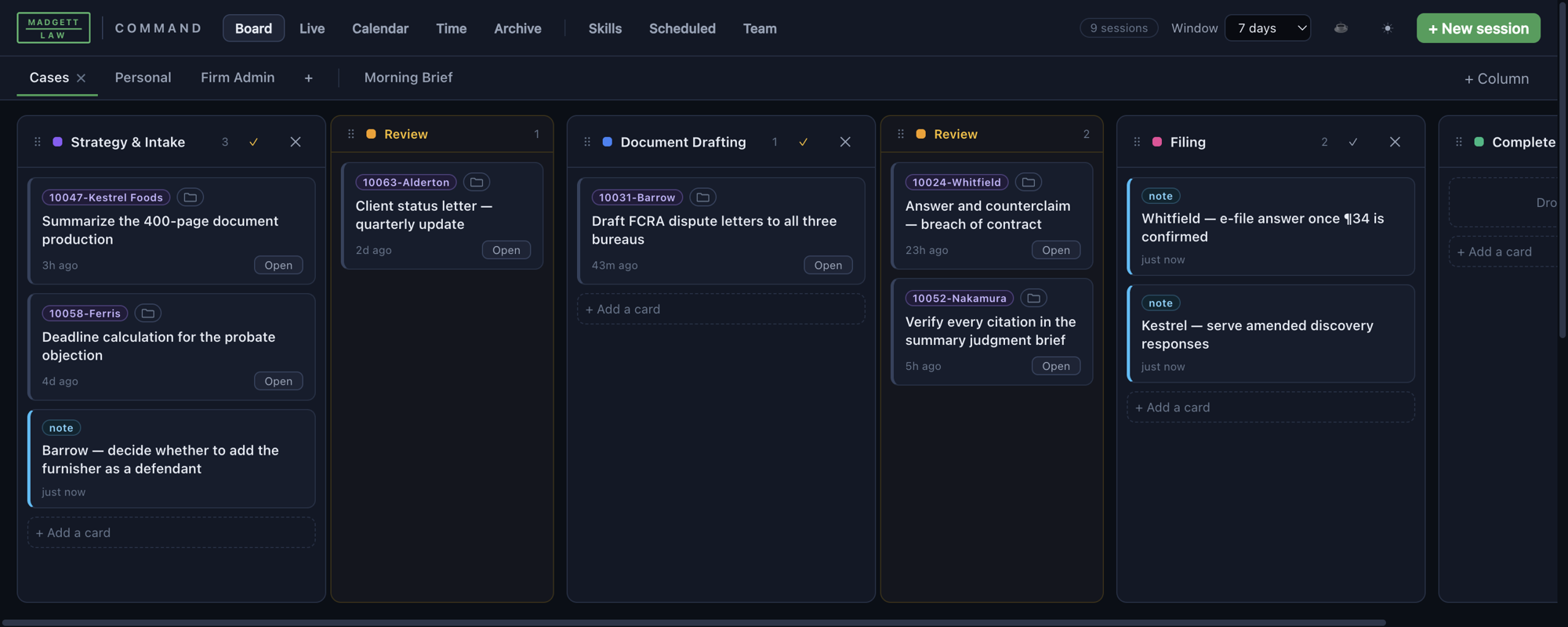
It’s called MLaw Command. It’s a native Mac app that turns every AI session into a card on a kanban board and ties that board to the things a practice already runs on — the matter list, the matter folders, the calendar, and the time record.
The board flips the relationship around. You stand on the board and look down at the sessions. Everything in flight shows at once, each card carrying its matter, its stage, and when it last moved. You send work into sessions instead of digging it out of them.
Read the screenshot like a docket, because that’s what it is. Six things in progress across five different matters. Two are sitting in a Review lane, which is the board telling me — without my going to look — that the AI’s finished and the work now wants a lawyer. Two are notes I typed myself, with no session behind them at all, because a board that only holds AI work is a board that lies about your day.
Here’s what that gets me:
Running six at once stops costing attention. I can run six sessions because I’m not the thing holding them together anymore. The board is. Review lanes bring up the ones that want me. The question “what is in flight?” gets answered by looking, not by remembering.
Context flows down instead of getting rebuilt from the bottom. A session started from a calendar event opens in that matter’s folder, with the deadline already on its card. It doesn’t have to work out where it is. That got decided above it.
The work outlives the session. Resume a conversation and its card follows it. Close a card and it goes to an archive, not into thin air. The session’s disposable. The record isn’t. That’s the biggest change of all: my work stopped living in windows I was afraid to close.
Look from above, then go in
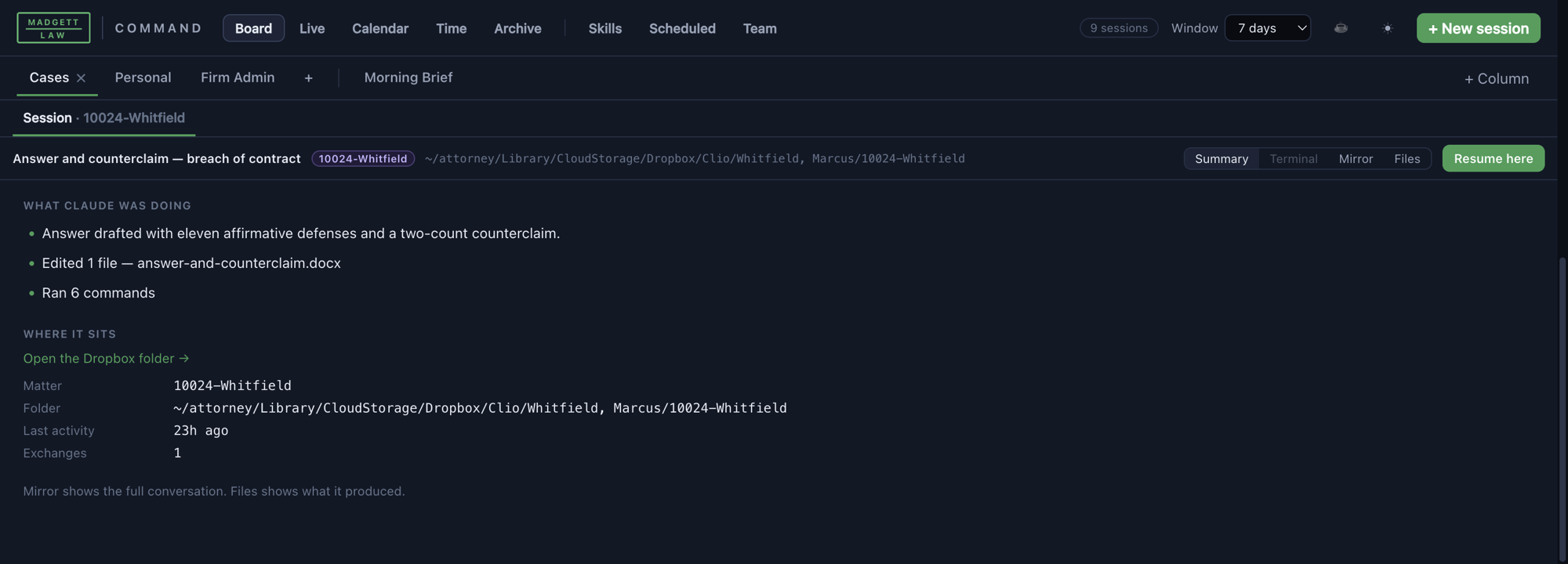
Click a card and you don’t land in a wall of conversation. You land on a summary: what it said last, which files it edited, how many commands it ran, whether it sent out sub-agents, which matter it belongs to, and where that matter lives on disk.
Those five questions from earlier — which matter, what did I ask, is it done, what came out, what’s next — all get answered right there without reading a thing. That’s the whole design, and it’s why the panel opens on the summary instead of the transcript. You triage from above. You go down into the conversation only when you’ve decided to.
One detail matters more than it looks. Nothing in that summary is generated. It’s counted straight off the session’s record — files actually written, commands actually run. It costs nothing to produce, and better yet, it can’t claim work that didn’t happen. A summary that flatters is worse than no summary, because you’ll act on it.
Quit looking for one assistant
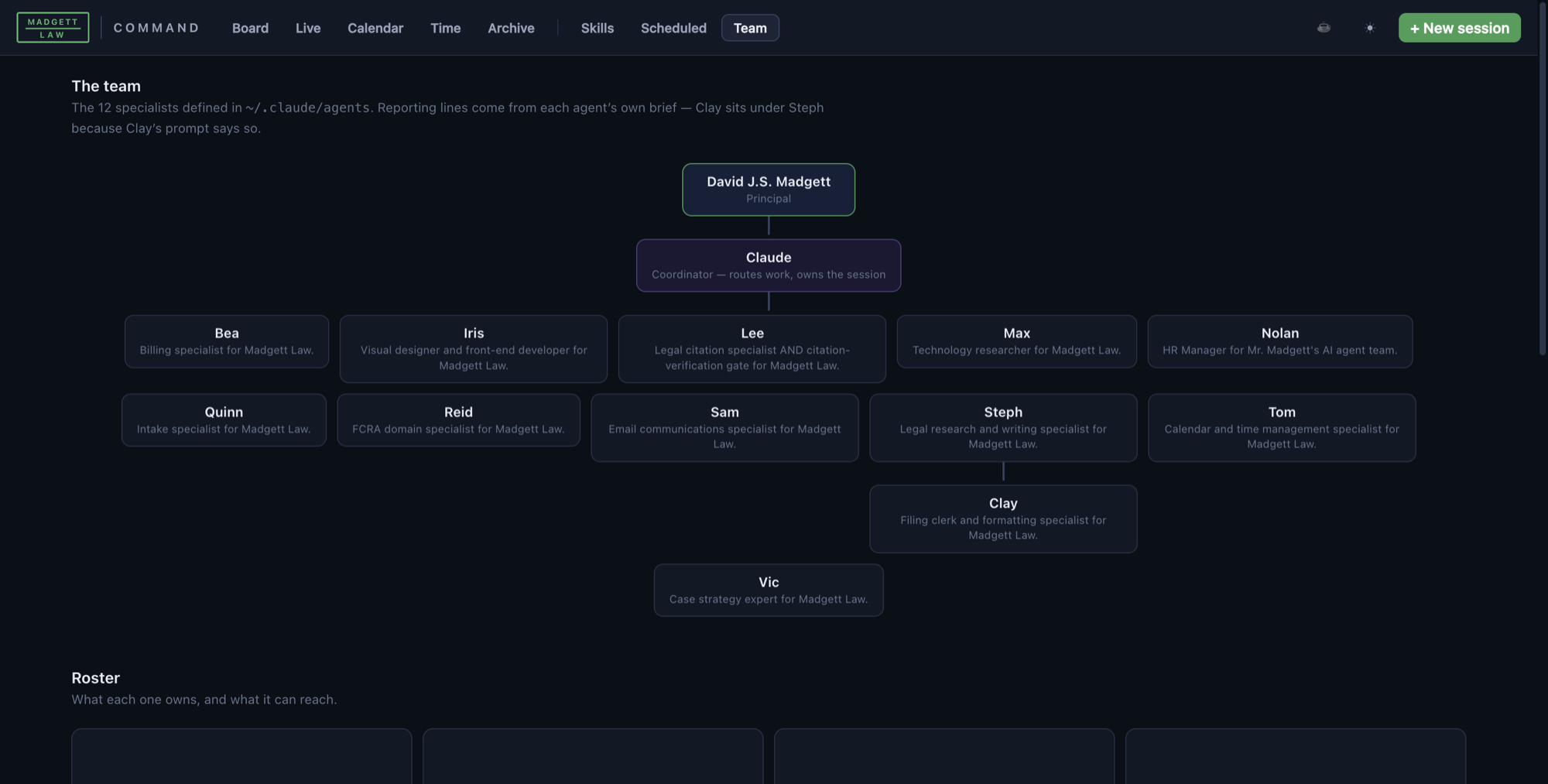
The second thing that changed how this firm uses AI was giving up on one general assistant.
A real office doesn’t have one person who does everything. It’s got a research and writing attorney, a citation checker, a filing clerk who owns formatting and court rules, a billing person, an intake coordinator, a calendar keeper. Each one has a defined job, a defined skill, and, most important, defined limits.
So that’s how the AI is organized here. Twelve specialists, each with its own written brief spelling out what it owns and, in so many words, what it has to hand off. The writing specialist drafts. The citation specialist checks every authority against the actual source, in multiple passes, and is told never to work from memory. The formatting clerk handles caption, spacing, signature block, and certificates, and isn’t allowed to change a word of argument. Work moves down the chain in a fixed order, and it goes through the citation gate before it gets anywhere near a court.
That gate exists because checking form isn’t checking truth, and only one of those is easy to automate. A citation can name a real case, sit in a real reporter, carry the right pin cite, and be Bluebooked to perfection — and still be stapled to a proposition the opinion doesn’t stand for. Nothing about how it looks is wrong, and that’s exactly the problem: a formatting pass will bless it every time. The only thing that catches it is going and reading the opinion. So that’s the rule here. Nothing with a citation in it leaves this office until somebody, or something, has gone and read the opinion, more than once, working from the source and not from a memory of the source.
The specialists aren’t there to keep things tidy. They’re where the checks live. One agent’s whole job is to disbelieve the last agent’s work, and nobody gets to skip it, because it’s a step in the chain and not a habit somebody has to remember.
The rules I had to put on it
Everything downstream of the board — which matter, which folder, which deadline, which time entry — depends on the labels being true. A view from above is worthless if it lies. I got these rules wrong first, and it cost me, so here they are.
Version one guessed a session’s matter by scanning it for any matter mentioned. It billed a website migration to a litigation file, because that session had once read a document in that client’s folder. It pumped the time on that matter from twenty hours to thirty-two. Reading isn’t working. Now attribution keys only on where a session actually wrote.
Version two matched client surnames on calendar events. It tied a hearing to the wrong file because the event title carried a judge’s surname that also happened to belong to a client. It had matched the judge. Event titles are full of judges, opposing parties, venues, and neutrals — almost all of them surnames that aren’t your client’s.
Both failures look the same: the system was confident, plausible, and wrong, and I couldn’t see the wrong part until I went looking. In a law practice that isn’t a bug. It’s a malpractice risk. A confidently wrong attribution puts a real deadline on the wrong file, or bills one client for work you did for another.
So here’s the rule now: an unattributed session is honest. A confidently wrong one isn’t. Where the system doesn’t know, it says so, and every guess it does make is labeled with where it came from. I’d rather look at a blank field than at a guess dressed up as a fact.
The same instinct gave me the limits the whole thing runs under, and I’d push them on anybody building something like it:
- Nothing posts to the practice management system. Unbilled time shows up for review. It’s a starting point for a time entry, never an entry. A human reviews and enters every one.
- Nothing runs unattended unless I’ve switched it on on purpose, and then only while I’m sitting there with the app open.
- No transcript ever gets altered or deleted. Archiving and renaming touch the board’s own records and nothing else. The underlying record of what was actually said never changes.
- It holds no credentials of its own and sends nothing anywhere. It listens on the local machine only. No cloud, no sync, no telemetry.
None of that is me being modest about the technology. A law office is a place where automated confidence lands on somebody who trusted you.
On availability, since people ask. MLaw Command isn’t a product and there’s nothing to download. I built it for this firm’s own setup and it assumes that setup — our folder conventions, our practice management system, our matter numbering. Packaging it for somebody else’s office is a different job than building it was. I’m writing about it because the shape of the problem is general even though my fix isn’t. If you run more than two AI sessions at a time, you already have this problem, and a whiteboard and a marker can solve it if that’s what you’ve got. If you’re building something like it and want to compare notes, I’d like that.
What the rules still require
None of this changes a lawyer’s duties. Three Minnesota rules do most of the work here.
Competence. Rule 1.1 requires “the legal knowledge, skill, thoroughness, and preparation reasonably necessary for the representation.” Comment [8] adds that to keep up that knowledge and skill, “a lawyer should keep abreast of changes in the law and its practice, including the benefits and risks associated with relevant technology.” Benefits and risks — the duty cuts both ways. Refusing to learn the tools won’t protect you, and neither will using them without knowing how they fail.
Confidentiality. Rule 1.6(c) requires that “[a] lawyer shall make reasonable efforts to prevent the inadvertent or unauthorized disclosure of, or unauthorized access to, information relating to the representation of a client.” That’s why how a tool is built matters more than what it can do. Where does the data go? Who else can read it? What’s kept, and by whom? If you can’t answer those questions about a tool, you can’t put a client file in it.
Supervision. Rule 5.3 — “Responsibilities Regarding Nonlawyer Assistants” — requires a lawyer with direct supervisory authority to “make reasonable efforts to ensure that the person’s conduct is compatible with the professional obligations of the lawyer,” and makes the lawyer responsible for conduct that would violate the rules if a lawyer did it, where the lawyer ordered or ratified it. However the doctrine ends up mapping these rules onto software, the working answer today isn’t in doubt: the output is your work product, you answer for it, and you sign it. An AI draft is a draft. A lawyer files.
Cited rules verified against the Minnesota Rules of Professional Conduct as published by the Revisor of Statutes. This is general commentary on practice management, not legal or ethics advice; every lawyer is responsible for their own compliance in their own jurisdiction.
What this is really for
A kanban board isn’t a moral achievement. It didn’t make me a better lawyer. It made me a lawyer who quit losing track of his own work. That’s a smaller claim, and a truer one.
But small and true adds up. The gap between what legal services cost and what most people can pay won’t close in one breakthrough. It closes, if it closes at all, the way it opened — a little at a time, through a thousand quiet inefficiencies in how law actually gets practiced. Every hour a lawyer spends reconstructing what she was doing shows up in somebody’s bill, or in a case she couldn’t afford to take. Take enough of those hours back and the math on who can afford a lawyer starts, slowly, to change.
That’s the bet, anyway, and it’s why I’m writing this down instead of keeping it to myself. Coming up in this section: the document intake pipeline that reads scanned mail and files it to the right matter; how the firm’s citation-verification gate works, pass by pass; deadline calculation, and why we never compute one from memory; the billing brain that finds work that never made it onto an invoice; and a fuller accounting of what hasn’t worked.
If any of it helps you, you know the price. Somebody who can’t afford a lawyer should get one anyway.
Questions, corrections, or a system of your own that works better — I would genuinely like to hear it. Send a message.