A law firm publishing software is a little odd, so here's how it happened.
The Practice Lab is where I write down how this firm actually runs: the specialist agents, the checklists, the citation gate, the time record nobody had to type. Most of that is a folder of plain text, and the right advice is to write your own. One piece wasn't. It was a program, people asked where to get it, and in February my answer was that there was nothing to download. This page is where that answer changed.
Download SessionCommand for MacVisit sessioncommand.ai
SessionCommand
A kanban board over your Claude Code sessions. Here's the idea behind it, from the README:
A Claude session is bottom-up: you are inside one conversation, and it is the only vantage point on its own work. This is top-down — the board is the vantage point, every session in flight is visible at once, and you direct work into sessions rather than discovering it inside them.
Here's what that looks like on the screen.
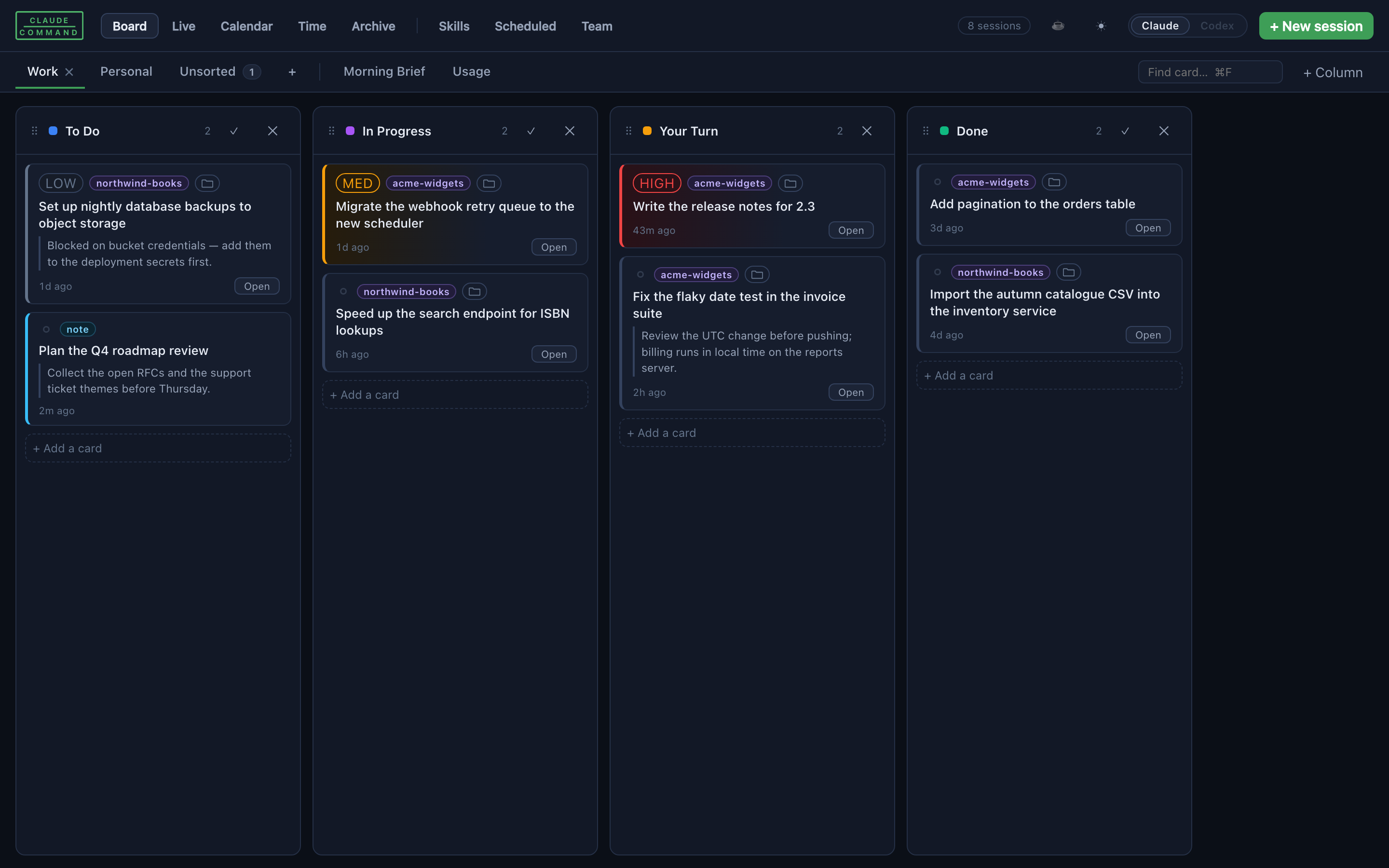
- Sessions find themselves. The board reads them from
~/.claude/projects/. There's nothing to import and nothing to register. - Every card carries its context. A label (a client, a case, a project), a stage, and its deadlines.
- Two ways in. Open a card into a live terminal and keep working, or into a clean read-only mirror of the session when you only want to know what happened.
- A time log grouped by label, rebuilt from the sessions themselves, and a calendar view of what's coming up next to the work attached to it.
- Labels from wherever your work already lives. Point it at folders on disk, or at any program that prints JSON. The second option is how a law firm points it at its practice-management system.
I wrote it for one law firm and then generalized it. That history still shows: the labels look like matter numbers because they started out as matter numbers. Read them as whatever your work is filed under. The longer story of why I built it is in Six Windows.
| Current release | 1.0.1, released October 23, 2026 |
|---|---|
| Runs on | A Mac, with Claude Code installed |
| Signed and notarized | Signed with an Apple Developer ID and notarized by Apple. Team ID 37LD23JKD7. |
| License | PolyForm Shield 1.0.0 |
| Website | www.sessioncommand.ai |
| Source | github.com/Davemadgett/claude-command |
| Download | Latest release on GitHub |
Install steps and requirements are in the README. They're kept there, next to the code, so they can't drift out of date on this page.
Who can use it for free
The license is short and you should read it before you install. The plain version: you can read, run, change and share SessionCommand for any purpose, and that includes running it in a business or a law practice. The one thing the license reserves is using it to provide a product that competes with it. If you are not sure whether something counts as competing, open an issue on the repository and ask.
How this fits the Practice Lab pledge
Everything in the Practice Lab is free. There's no signup and nothing for sale, and the only ask is this one: if something there saves you time, spend some of it on people who could not otherwise afford you. The essays about SessionCommand are part of that, and so is the source code, which anyone can read. The license is the one place this page asks for anything more, and it doesn't ask it of a nonprofit or a government office. The pledge doesn't change either way. If the board buys you back an hour, you know where it goes.
Support, bugs and questions
Madgett Law, LLC doesn't sell support contracts for this software, and none come with it. The license says it comes as is, without any warranty.
Found a bug? Open an issue on GitHub Issues, where the fix and the discussion stay public for the next person who hits it. For anything else, send a message.
Downloading or using this software doesn't create an attorney–client relationship with Madgett Law, LLC, and nothing on this page is legal advice. This page describes software. It makes no claim about the result of any legal matter.